Connect an AI assistant (MCP)
Ask your fleet questions in plain language from Claude, ChatGPT or another AI assistant. The assistant speaks the MCP protocol to the Filodos server and reads only your own organization's data. Part of the documentation.
Connect
You need one thing only: an API key of your organization. The server is one and the same for every assistant:
https://filodos.gr/api/mcp- Create a key on the dashboard’s Organization → AI assistants page. The page creates the key with the right scopes and pre-fills every snippet with it.
-
Claude Desktop: Settings → Extensions → Advanced settings. Merge this block into
claude_desktop_config.jsonand save:
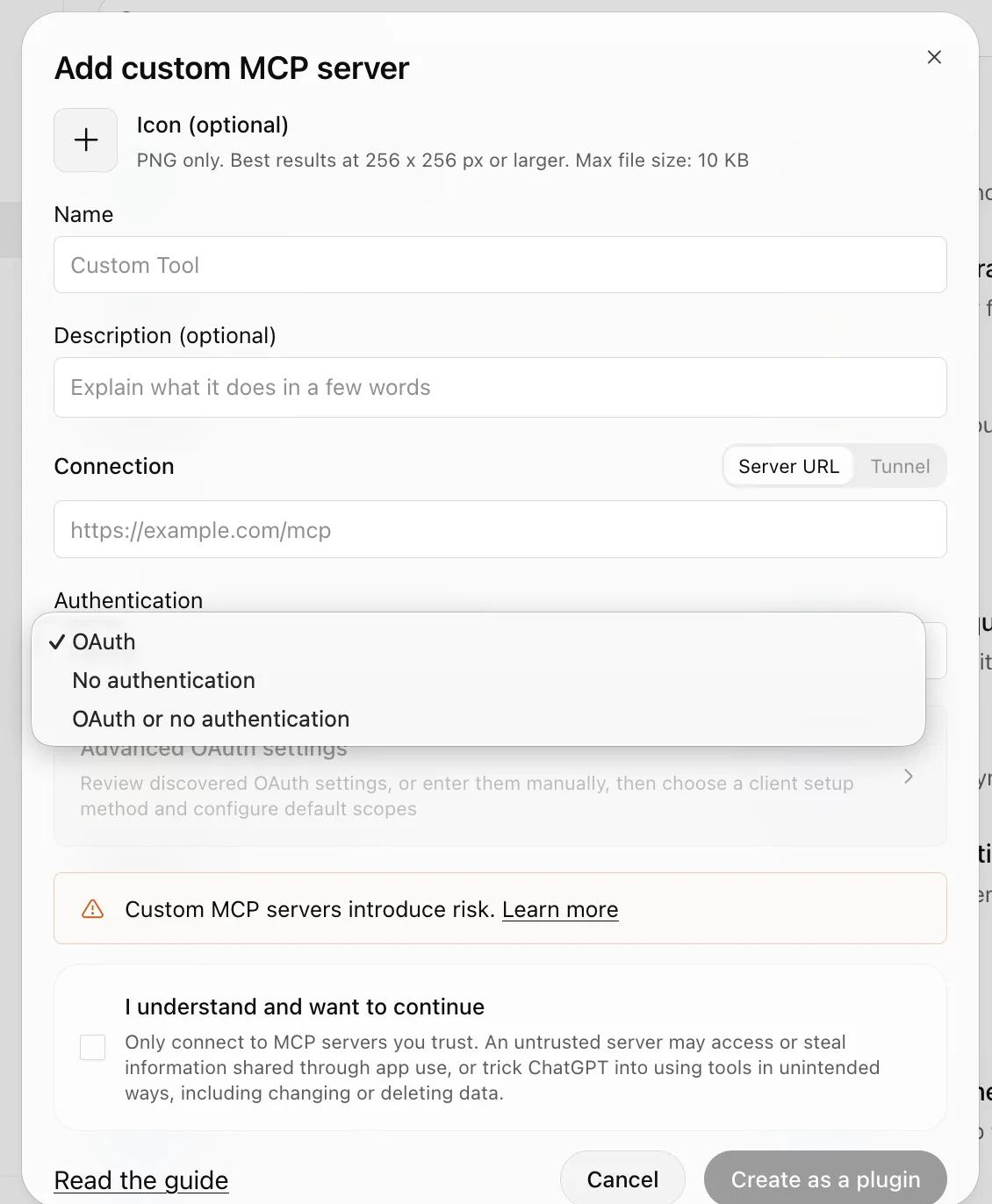
Node.js is required (nodejs.org). Restart Claude Desktop after saving.{ "mcpServers": { "filodos": { "command": "npx", "args": [ "-y", "mcp-remote", "https://filodos.gr/api/mcp", "--header", "Authorization: Bearer YOUR_KEY" ] } } } - ChatGPT: Settings → Connectors (Apps) → create a connector. Paste the URL and choose OAuth. ChatGPT opens a Filodos sign-in page — sign in and allow access. No key needed.
-
Claude Code: run this command once in a terminal. Replace
YOUR_KEYwith your key:
Then runclaude mcp add --transport http --scope user filodos https://filodos.gr/api/mcp --header "Authorization: Bearer YOUR_KEY"/mcpin Claude Code. The filodos server shows as connected. The--scope useroption makes the server available in every project.
-
Cursor: edit
~/.cursor/mcp.json(create it if it does not exist):
Restart Cursor.{ "mcpServers": { "filodos": { "url": "https://filodos.gr/api/mcp", "headers": { "Authorization": "Bearer YOUR_KEY" } } } } -
GitHub Copilot (VS Code): requires VS Code 1.99+ and the GitHub Copilot extension. Open the Command Palette, run MCP: Add Server, or create
.vscode/mcp.json:
Restart VS Code.{ "inputs": [], "servers": { "filodos": { "url": "https://filodos.gr/api/mcp", "headers": { "Authorization": "Bearer YOUR_KEY" } } } } -
Windsurf: edit
~/.codeium/windsurf/mcp_config.json(create it if it does not exist) with the samemcpServersblock as Cursor above. Restart Windsurf. -
OpenAI Codex CLI: install with
npm install -g @openai/codex(Node.js required), then edit~/.codex/config.toml:[mcp_servers.filodos] command = "npx" args = ["-y", "mcp-remote", "https://filodos.gr/api/mcp", "--header", "Authorization: Bearer YOUR_KEY"] -
pi coding agent: run once in a terminal:
pi mcp add filodos --url https://filodos.gr/api/mcp --header 'Authorization=Bearer YOUR_KEY' -
Other tools (Zed, Amazon Q, Continue, OpenCode, Muse Code, and others that read an
mcpServersJSON config): use the same block as Cursor above. If theurlfield does not connect, use themcp-remoteblock from the Claude Desktop step instead. - Test: ask your assistant “where is my fleet right now?”. If it answers with the live positions, the connection works.
The dashboard’s AI assistants page walks through all of this step by step, in Greek and in English, with your key already inside every snippet.
Tools
The assistant sees ten read-only tools. Each tool reads what the matching endpoint of the public API reads, with the same organization scope. Every answer row also carries a dashboard_url link to the dashboard page. Dates are always fleet-local (Europe/Athens).
list_vehicles— the fleet list: name, status, current drivers, recorded distance. Scopeanalytics:read. Parameters:limit(default 200).get_vehicle_position— a vehicle's newest GPS fixes (default: the latest one). Scopepositions:read. Parameters:device_id,limit.get_vehicle_trips— a vehicle's trips, newest first. Scopetrips:read. Parameters:device_id.get_driving_events— a vehicle's driving events (overspeed, harsh braking, fatigue, ADAS, SOS, zone crossings). Scopeevents:read. Parameters:device_id.get_site_visits— stays inside geofence zones (site visits). Scopeevents:read. Parameters:device_id,since,until,limit(blank bounds = last 30 days).get_daily_summary— a vehicle's daily summary: per trip, overspeed bands, idling, night mileage, cost. Scopereports:read. Parameters:device_id,day(blank = yesterday), optional cost rates.get_weekly_report— the Monday–Sunday week rollup with narrative and safety score. Scopereports:read. Parameters:device_id,week(blank = the last finished week).get_driver_overview— per-driver rollups across every vehicle each driver used: totals, per-type rule breaks, score. Scopedrivers:read. No parameters.get_safety_scores— a vehicle's stored period scores with their breakdown. Scopescores:read. Parameters:device_id.get_telemetry_bursts— the "black box" burst summaries (per-second GPS/acceleration). Scopetelemetry:read. Parameters:device_id,since,until,limit.
Photo and video files do not travel over MCP. The assistant gets metadata and the dashboard link, where you view them.
Security
- Read-only. No tool writes anything, sends a command to a vehicle, or changes a setting.
- The key or OAuth token travels in the
Authorizationheader on every request — never in the URL, so it never lands in access logs. - With an OAuth sign-in (ChatGPT) the token lasts one hour and renews itself while in use. It never writes.
- The server accepts at most 120 requests per minute per connection. Above that it answers
429for one minute. - Errors:
401unknown key or expired token,403the tool's scope is missing,404another organization's or unknown vehicle (never revealed which).
Revoke the key any time on the AI assistants or API keys page — every assistant stops at once. For assistants connected with a Filodos sign-in (OAuth), access ends with the token, and we cut it for good on request to support@filodos.gr.